

How to navigate the SAP Screen?
SAP Screen consists of many icons based on specific purpose. SAP will work with transaction codes. For each and every activity, there is alfa numeric code will be used to execute any activity or to see any report. There is no transaction code required if we want to access SAP through portal. SAP Screen and Menu will looks like the following screen,
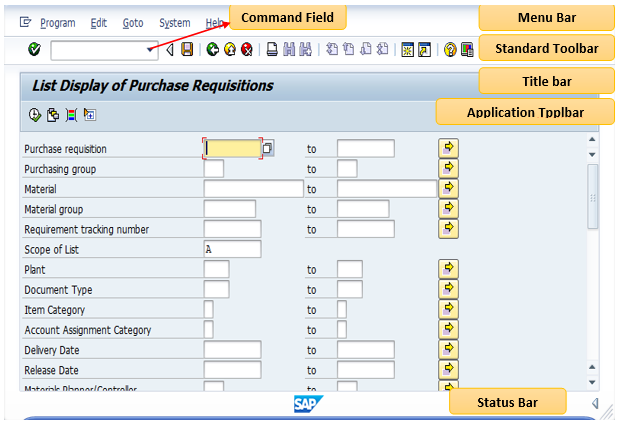
Command Field
Here we can enter the required transaction code
Menu Bar
This is the Top line of any SAP Screen, where different menus are available
Standard Toolbar
All buttons / Icons will be showed below menu bar. It will come with every screen
Title Bar
It will be below standard tool bar and It shows the description of transaction.
Application Toolbar
Here it shows the buttons /icons related to present transaction
Status Bar
It will come at the bottom of each SAP Screen. It shows all types of status.